
In a sentence — sequence the change into phased, owned milestones, with dependencies and delivery risk tracked against every one of them.
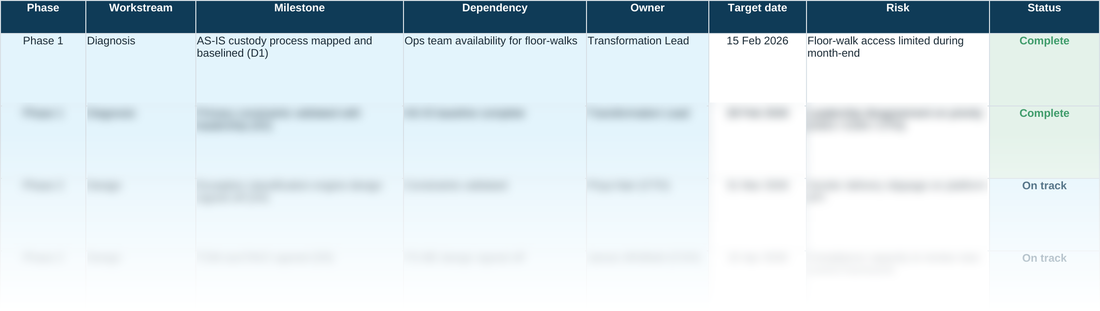
A roadmap that looks credible on the slide and falls apart in delivery usually has one thing in common: nobody could see the dependencies until they broke. This tool forces every milestone to name what it's waiting on, who owns it, and how it's tracking — before it goes anywhere near a steering committee.
It isn't a generic Gantt template. Status updates colour themselves automatically as work progresses, so a stalled milestone is visible at a glance rather than buried in a status report nobody reads until the retrospective.
WHY THIS HELPS
One row per milestone, not per task — a milestone is a checkpoint the business would recognise as progress (‘pilot live in one branch’), not an internal step like ‘write test script’. If this sheet heads past roughly 15–20 rows, that's usually a sign of tracking tasks rather than milestones; that level of detail belongs in a project plan, not this roadmap.
WHAT DEPENDENCY SHOULD HOLD
Dependency is easy to fill with a vague risk statement, but it's asking a narrower question: what specific thing does this milestone need before it can start — a decision that hasn't been taken yet, another milestone further up the sheet, or a delivery from outside the programme entirely (a vendor API, a regulatory sign-off, a data feed). Naming that precisely is what makes a roadmap re-sequenceable when something slips, because you can trace exactly which downstream rows are now exposed rather than re-deriving the chain from memory in the steering committee. Risk is a separate column on purpose: Dependency is about ordering, Risk is about what could go wrong within that ordering — conflating the two is how a genuine blocker ends up buried in a general-purpose risk register nobody reads until it's already late.
D6 · Change Roadmap & Plan — the blank tool
Ready to complete for your own engagement. Blue-tinted cells are for you to fill in.
Worked example
The same tool completed end to end, using the fictional Meridian Wealth Management scenario — see what ‘done’ looks like before you start your own.
A quick walkthrough of the sheet:
Need the full method, not just one step?
All eleven instruments — D1 through D10 and the Prioritisation Matrix — at a discount against buying them separately.