
In a sentence — track whether the outcomes promised at design stage are actually landing and holding, against the same baseline you started with.
The moment a programme closes is exactly when benefit tracking tends to stop — which is also exactly when a benefit is most likely to quietly erode. This tool is built to keep running past go-live, into Step 10, so ‘realised’ means sustained, not just observed once during hypercare.
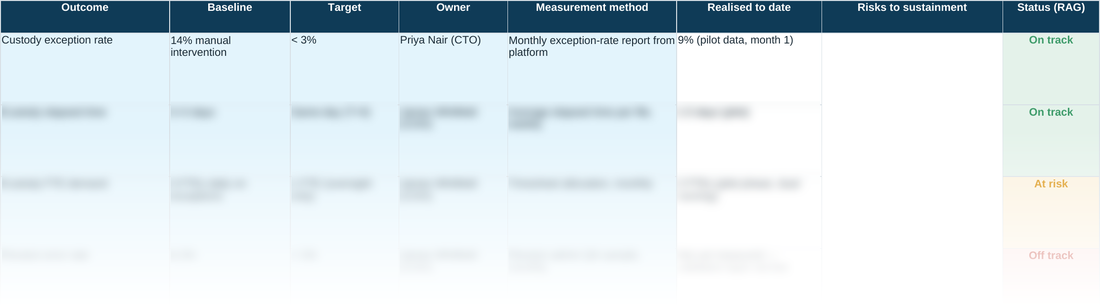
Baseline and target sit in the same row as Realised to date, so there's no separate spreadsheet to reconcile against and no way to redefine success partway through by moving the baseline.
WHY THIS HELPS
One row is one outcome, never one activity. ‘Migrated to the new platform’ is an activity; ‘reconciliation exceptions down 40%’ is an outcome. Tracking activities makes a programme look busy; tracking outcomes is the only thing that tells you whether it worked.
READING BASELINE, TARGET AND REALISED TOGETHER
There's no formula column forcing a percentage here on purpose — the three figures sit side by side so you read them in context rather than trust a single derived number. A Realised to date sitting close to Target with Status still amber is a real, common pattern worth naming, not a contradiction to resolve: it usually means the number is real but not yet proven durable — a pilot result, a single good month, a figure that hasn't survived a full reporting cycle yet. That's exactly the gap Status (RAG) is for. An outcome doesn't move to Realised the moment the number is first hit; it moves there once it's held for long enough that Off track or At risk would clearly be the wrong call — which is a judgement this sheet asks you to make explicitly, row by row, rather than automate away.
D7 · Benefits Realisation Tracker — the blank tool
Ready to complete for your own engagement. Blue-tinted cells are for you to fill in.
Worked example
The same tool completed end to end, using the fictional Meridian Wealth Management scenario — see what ‘done’ looks like before you start your own.
A quick walkthrough of the sheet:
Need the full method, not just one step?
All eleven instruments — D1 through D10 and the Prioritisation Matrix — at a discount against buying them separately.