
Sold under the Optimize10 Toolkit Licence and Terms and Conditions of Use, which you will be asked to accept at checkout. The licence covers use within the purchasing organisation only. Buying for more than one company in a group, or for consulting or training work? Contact us.
What this tool does
By Step 8 the target operating model says what has to change and the roadmap says in what order. What is still missing is the organisation that will deliver it: the workstreams, the people who lead them, the forums that make the decisions and the office that keeps the record. Most programmes assemble that in a hurry, and the gaps show up months later, in delivery, where they cost the most.
This kit stands that organisation up deliberately. It puts a name against every role, writes down who decides what and where it escalates, builds the workstreams on what has to be delivered rather than on the organisation chart, and checks every critical function against them so nothing is left without a home. A readiness check reads every tab and tells you, in one line, whether you are ready to start delivery.
KIT OR PLAN? YOU NEED BOTH, AND THEY DON'T OVERLAP
PLAN answers what gets done and when: phased milestones, owners, target dates and the dependencies between them. KIT answers who decides, who delivers and how the programme is run: roles, workstreams, forums, the Programme Office and the kick-off. KIT names each workstream and its lead; PLAN uses those names on its milestones. Milestone dates live in PLAN only, so the two never hold the same information twice.
WHY THE COVERAGE CHECK MATTERS
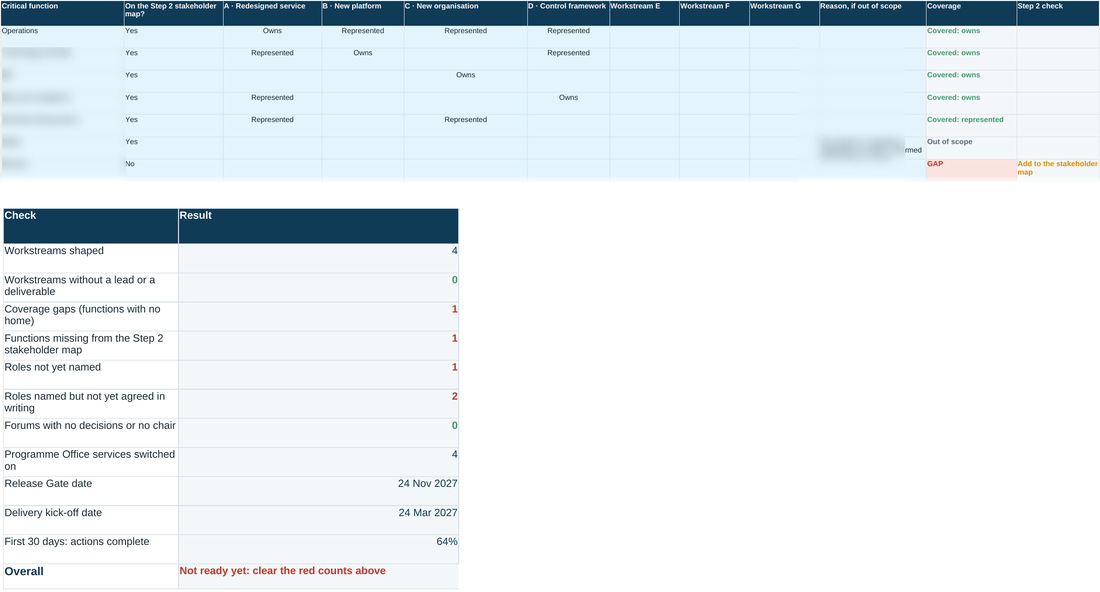
The function that gets forgotten is rarely operations or technology. It is the enabling one: finance, legal and regulatory, data migration, the decommissioning of whatever the change replaces. The coverage check takes every function from the Step 2 stakeholder map and asks whether it owns a deliverable, sits on a workstream board, or is out of scope for a recorded reason. Anything else is flagged as a gap, while it is still cheap to fix.
What's included
KIT · Programme Launch Kit (workbook)
Six working tabs: Programme on a page with the readiness check, Roles, Workstreams and the coverage check, Forums and the decision calendar, Programme Office, and Kick-off with the first 30 days. Blue-tinted cells are for you to fill in.
Worked example
All six tabs completed for an illustrative multi-workstream service transformation, including the gap the coverage check finds, so you can see what ‘done’ looks like before you start your own.
Companion templates
A sponsor commitment note, a delivery kick-off deck, a gate meeting pack and a Programme Office charter, ready to complete in Word and PowerPoint.
How it's used
A quick walkthrough of the workbook, in the order the book sets out:
Need the full method, not just one step?
All thirteen instruments, bundled at a discount against buying them separately.